
- Home
- Financial Statements Center
From trial balance to auditor-ready statements
No more copying the trial balance into Excel and reclassifying every account each year. Pull balances from your books or upload them from a file. The center maps them to statement lines, numbers the notes, checks everything before approval, then issues a locked PDF that never changes.
- 4 statements with comparatives
- Self-numbering notes
- Never edits your books


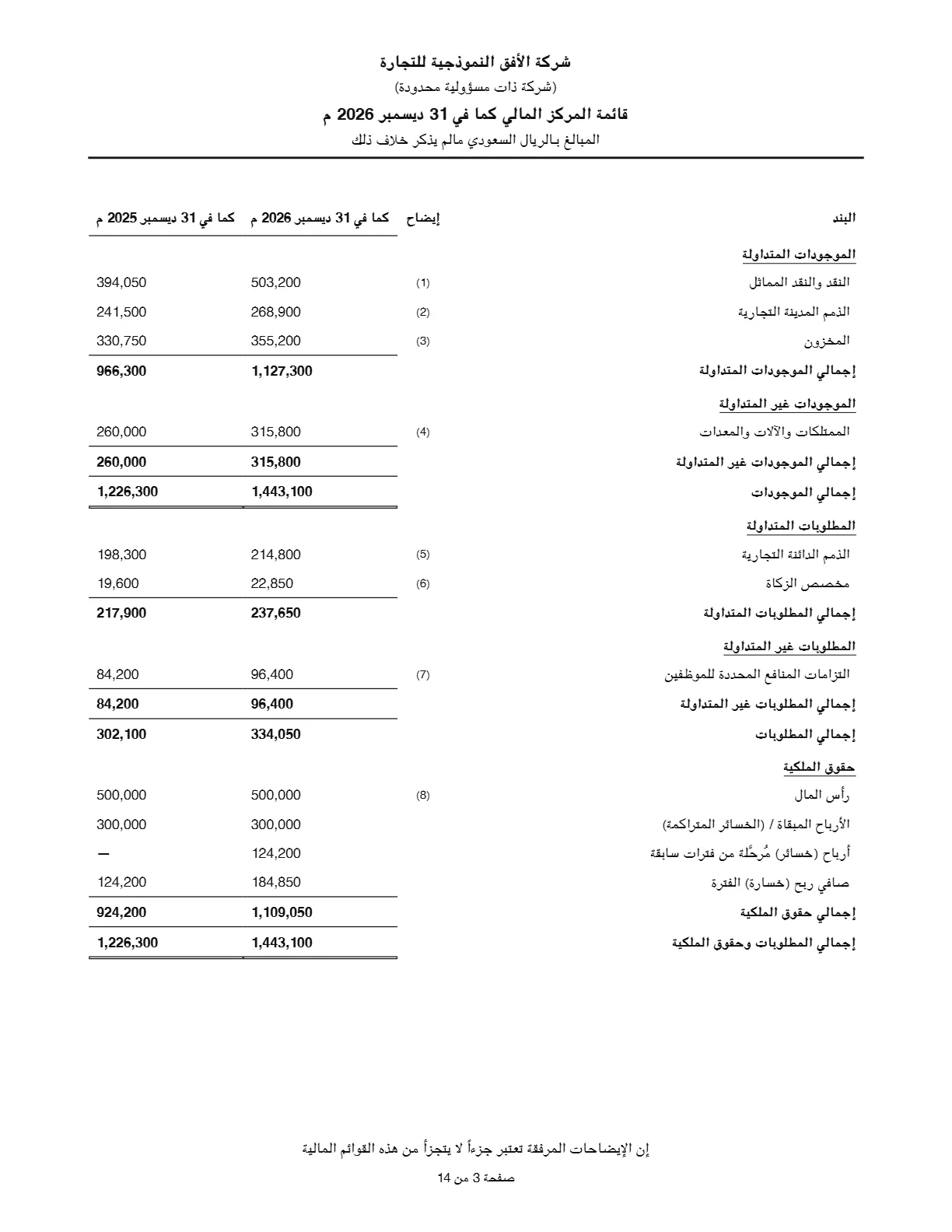
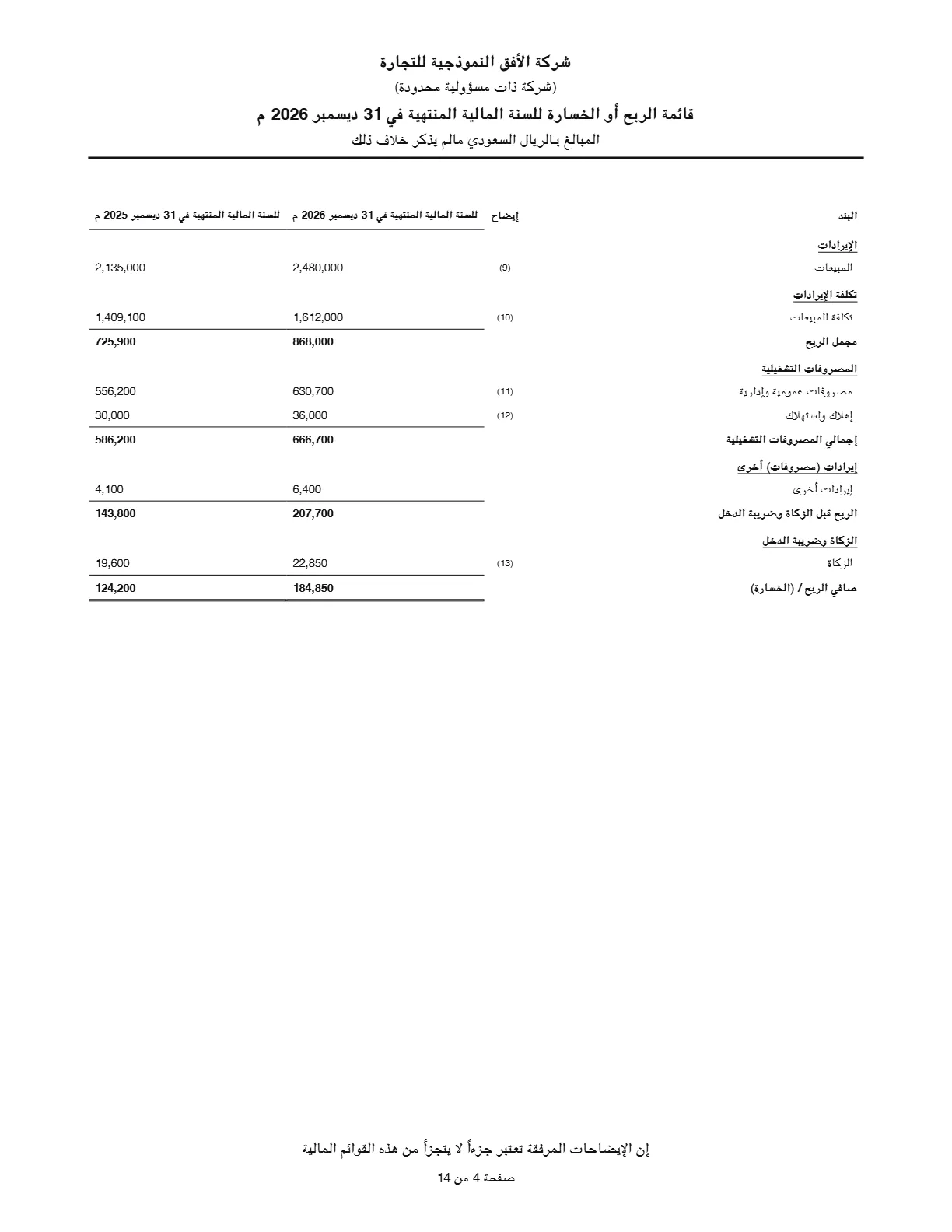
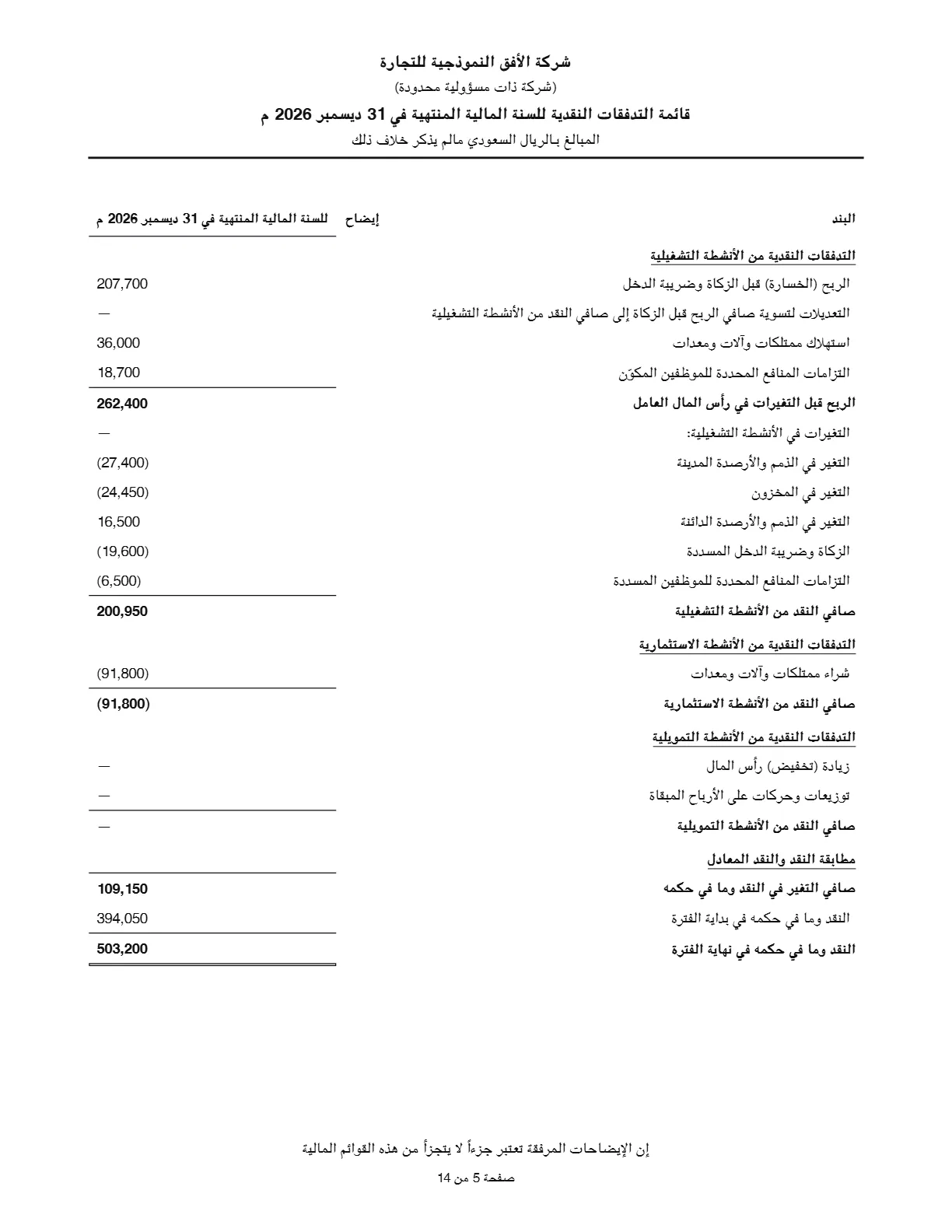
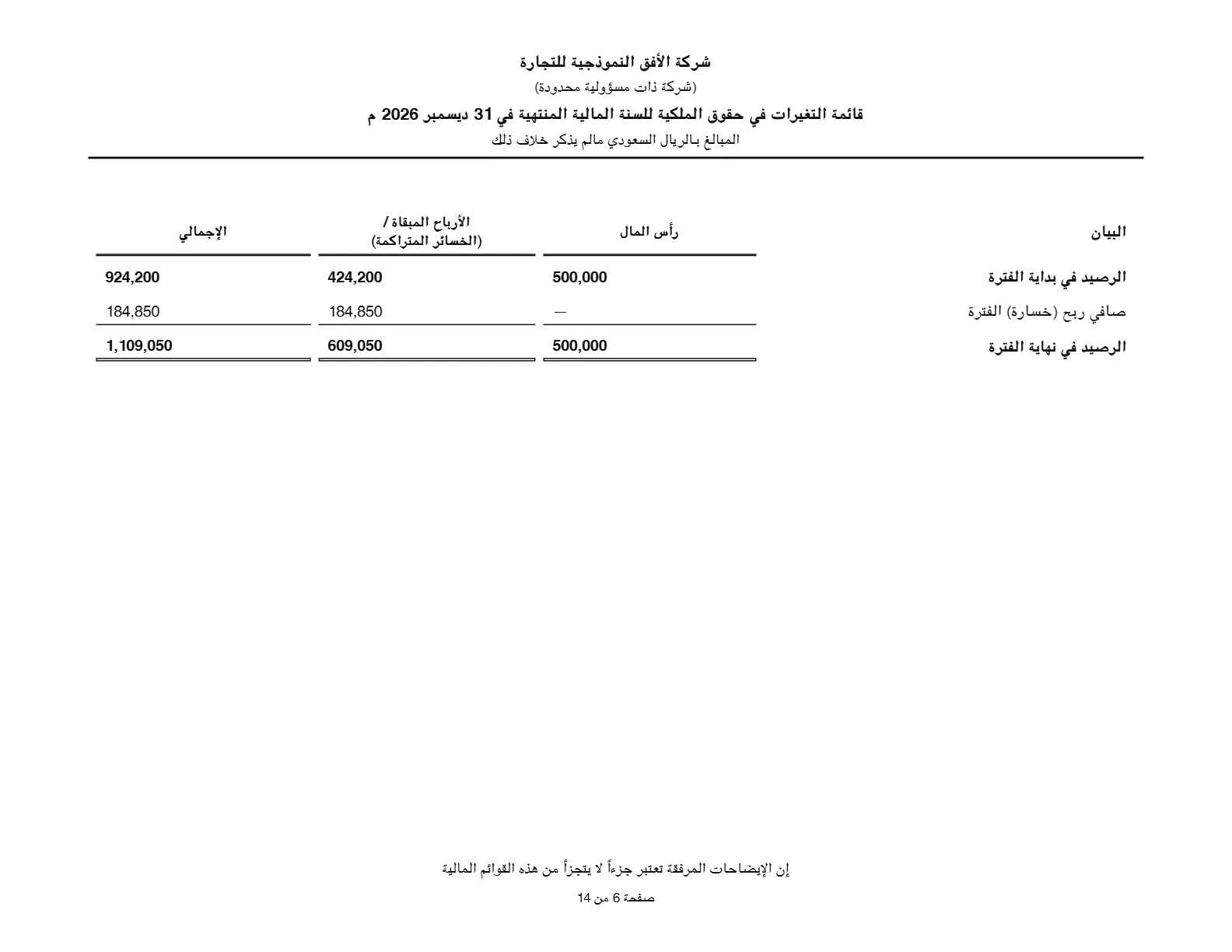
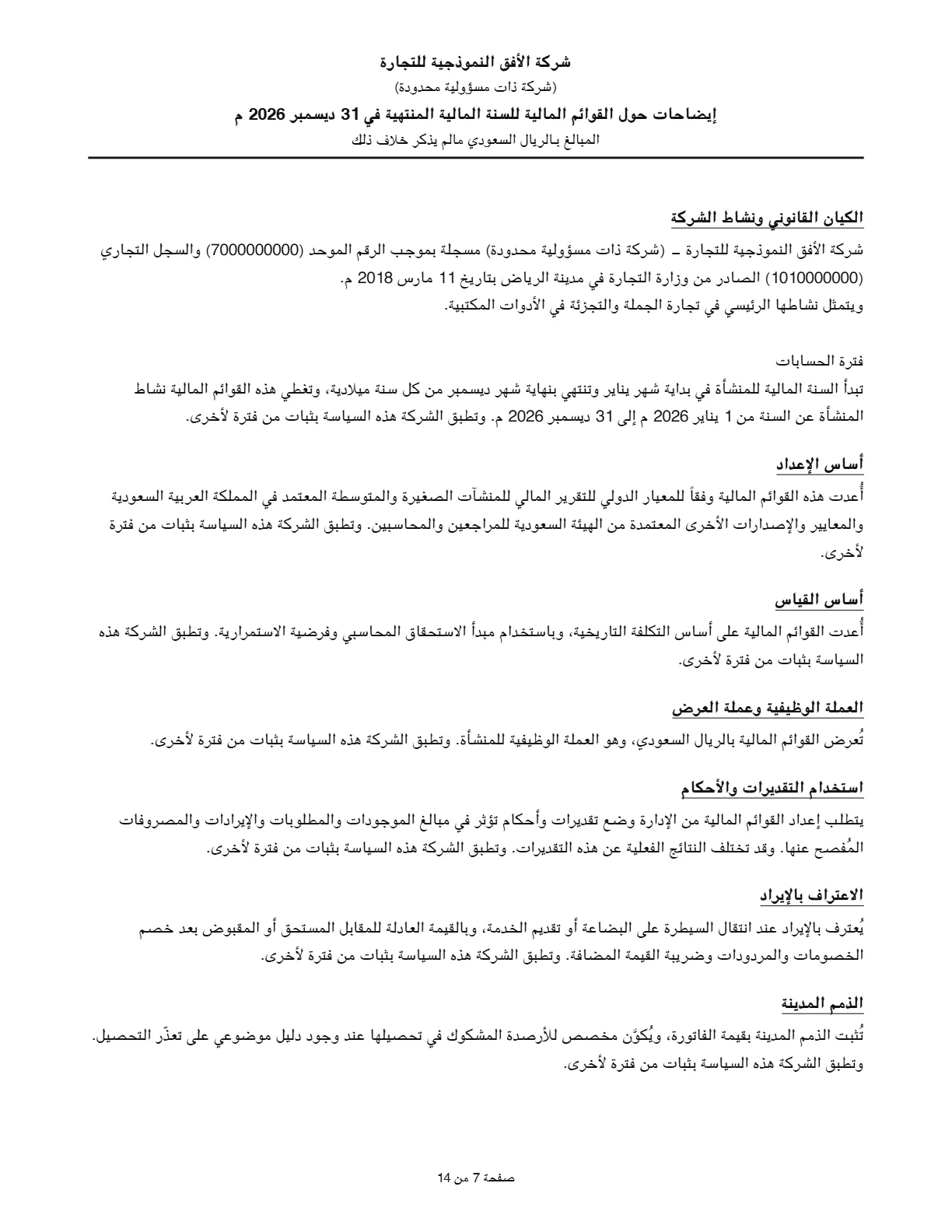
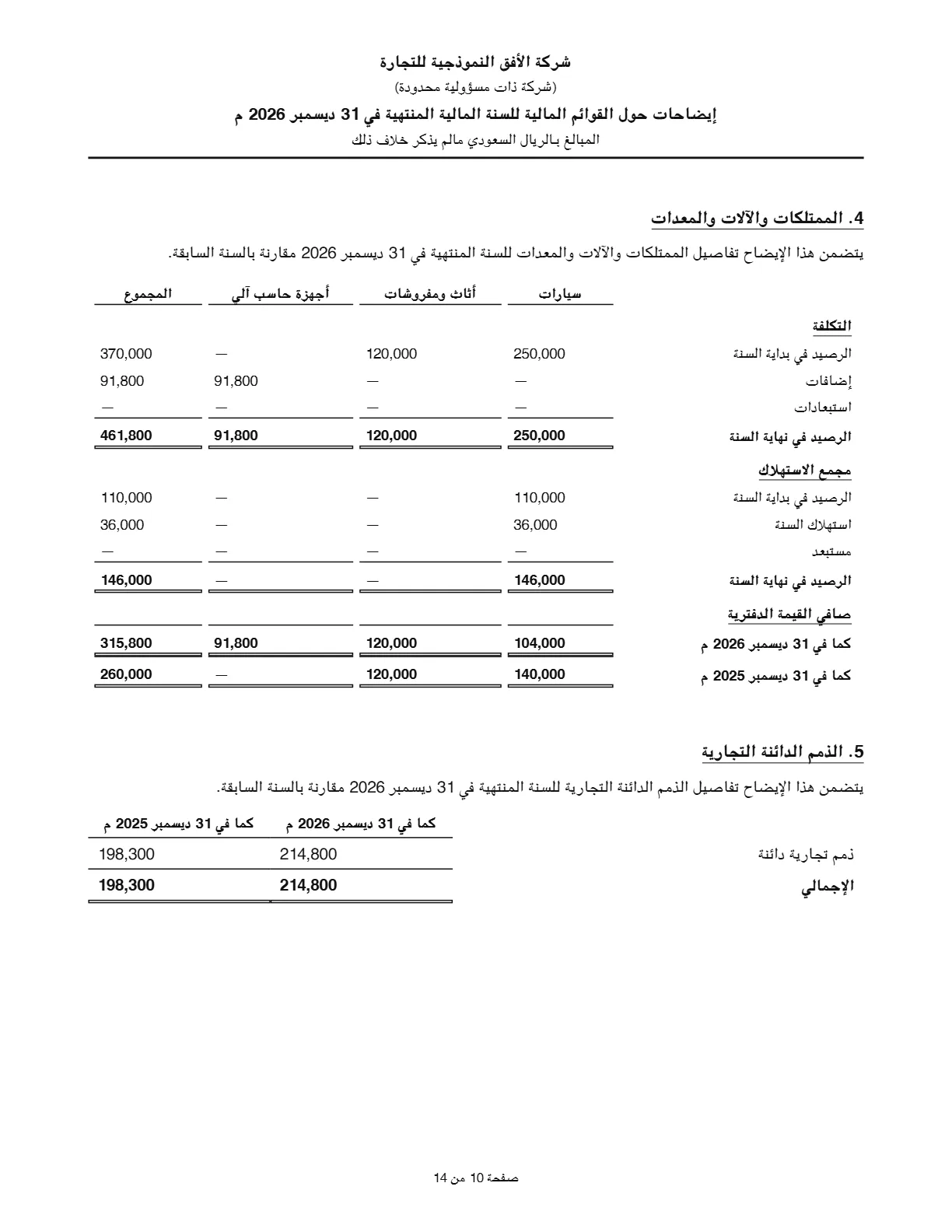
Real pages of a PDF issued by the center for a fictional company (the issued PDF is in Arabic)
Year-end statements without conflicting Excel files
Every year the same work repeats: move the balances, reclassify, number the notes, then hunt for a small difference before the auditor's deadline. The center turns it into clear steps that are saved and carried into next year.
The usual way Days of manual work
- Copy the trial balance to Excel and reclassify every account by hand each year
- One broken cell breaks the equation, and the difference surfaces at the auditor
- Notes numbered by hand, out of order after any change
- Many copies of the file, and nobody knows which one was approved
With the Statements Center Steps saved and repeated
- Balances straight from your books, and account mapping carries into next year
- Automatic checks block approval on any equation or cash difference
- Notes number themselves, and each note number shows beside its line
- One issued version, locked with a fingerprint, and an alert if the books change after it
Six steps from trial balance to issued version
Each step has its own screen and progress, and the center always points you to the next one. See the real screens in the system tour →
Pull the trial balance
From your 123 ERP books in one click, or upload it from Excel if your books live in other software.
Map accounts to statement lines
Automatic suggestions that learn from your choices, with progress showing what is still unmapped.
Add adjustments
Adjustments live inside the statements file only. They never touch your entries or book balances.
Review statements and notes
The four statements with comparatives, numbered notes, and accounting policies ready to edit.
Run the checks and approve
Balanced equation, matching cash, complete mapping. A critical error blocks approval.
Issue a locked PDF
A numbered version with a fingerprint that never changes. Corrections need a reasoned reopen and a new version.
Everything year-end statements need, in one place
The four statements
Financial position, income, changes in equity and cash flows, each with a comparative column.
Self-numbering notes
Disabled notes get no number, numbering stays continuous, and the number shows beside its line.
Ready accounting policies
An editable policy library that fills in the entity's name and details, plus your own policies.
Checks before approval
Equation, cash, mapping and comparatives. The checks run again at the moment of approval.
Fixed assets and zakat
A fixed assets note from balances, reconciled to the asset register, and the zakat provision movement.
Language and presentation unit
Statements on screen and in Excel in Arabic or English, the issued PDF in Arabic, presented in riyals or thousands without touching the real figures.
Locked, fingerprinted version
What was issued never changes and is verified on every open. You are alerted if the books change after issue.
PDF, Excel and a full log
A formatted PDF and an Excel file, plus a log of who did what and when in every file.
For companies and accounting firms alike
Statements straight from your books
Balances are pulled from your entries as they are, with no copying. Next year, mapping, notes and policies are ready from the year before.
- Your in-house accountant prepares the statements before the auditor arrives
- Comparatives with the prior year in every statement
- Permissions decide who edits, who approves and who issues
Your clients' statements, even when their books are elsewhere
Upload the trial balance from Excel or CSV. The center reads columns by meaning, not position, understands accounting brackets and Arabic digits, and takes you all the way to issue.
- Preview the file before committing, with a warning on any unbalanced trial balance
- Re-uploading the trial balance keeps your account mapping
- Each client's entity details on the statements' cover
Start statements season at no extra cost
A yearly add-on for any plan
With Business Management or All-in-One
For new Business Management or All-in-One Plan subscribers
- The full Financial Statements Center for your whole first year
- Covers the entire 2026 year-end season
- Every feature of your plan included
- Renews at SAR 1,500 per year after the first year
Add to your subscription
Added to a subscription on any plan
- Four statements, notes and policies
- Trial balance import from Excel
- Checks, approval and locked PDF issue
- Statement files with no limit on years
Prices exclude VAT.
Before you start
Does it change my journal entries or balances?
No. The center reads balances from your books and never writes to them. Adjustments you add are kept inside the statements file only, so your books stay as they are.
My books are not on 123 ERP. Can I still use it?
Yes. Upload the trial balance from an Excel or CSV file, and the center handles mapping, statements, notes and issuing as if the balances came from 123 ERP. This suits accounting firms serving clients on other software.
Which languages are the statements issued in?
On screen and in the Excel export, Arabic or English as you choose, in riyals or thousands of riyals. The issued PDF is in Arabic.
What exactly is the launch offer?
New Business Management or All-in-One Plan subscribers until 31 January 2027 get the Financial Statements Center free for the first year of their subscription, then it renews at SAR 1,500 per year. Prices exclude VAT.
Can I try it before subscribing?
The center is not part of the free trial. We show it to you in a live demo on sample data. Contact us on WhatsApp to book one.
Does it replace the external auditor?
No. It prepares and checks the statements and notes so they reach the auditor organized and balanced. The external auditor's opinion stays as it is.
Statements season starts with the December close
Prepare your year-end statements with confidence
Subscribe to the Business Management or All-in-One Plan before 31 January 2027 and get the Financial Statements Center free for the first year.
Add the Financial Statements Center to your subscription for SAR 1,500 per year.